Doradztwo biznesowe +48 790 550 190
email pomoc@sellintegro.pl
Alternatywa dla BL - SellRocket OMS
Zobacz więcej


Black Friday! −10% od 2000 zł i dodatkowe −10% od 4000 zł. Łącznie prawie 20% rabatu!
We wtyczkach do aktualizacji cen w Sellintegro istnieje możliwość dodania własnych skryptów. Jednym z najczęściej stosowanych mechanizmów jest mnożnik cen, który pozwala automatycznie podnosić lub obniżać ceny produktów według ustalonego współczynnika.
using System;
using System.Xml.Linq;
using System.Linq;
namespace Sellintegro
{
public class External
{
public XElement ProcessSourceData(Action<string> writeError,
Action<string> writeWarning,
Action<string> writeInfo,
XElement bodyXml)
{
decimal multiplier = 1.09m;
foreach (var product in bodyXml.Elements("product"))
{
var priceListItems = product.Element("priceListItems");
if (priceListItems == null) continue;
foreach (var pli in priceListItems.Elements("priceListItem"))
{
var nameEl = pli.Element("priceListName");
if (nameEl == null) continue;
var name = nameEl.Value;
if (name != "Detaliczna")
continue;
var priceData = pli.Element("priceData");
if (priceData == null) continue;
var netEl = priceData.Element("net");
var grossEl = priceData.Element("gross");
if (netEl == null || grossEl == null)
continue;
decimal net;
decimal gross;
decimal.TryParse(netEl.Value, out net);
decimal.TryParse(grossEl.Value, out gross);
decimal newNet = Math.Round(net * multiplier, 2);
decimal newGross = Math.Round(gross * multiplier, 2);
netEl.Value = newNet.ToString();
grossEl.Value = newGross.ToString();
}
}
return bodyXml;
}
}
}
Skrypt automatycznie:
multiplier = 1.09decimal newNet = Math.Round(net * multiplier, 2);
decimal newGross = Math.Round(gross * multiplier, 2);
Aby dodać skrypt do swojej wtyczki,, przejdź do jej konfiguracji i wybierz zakładkę "Skrypty"
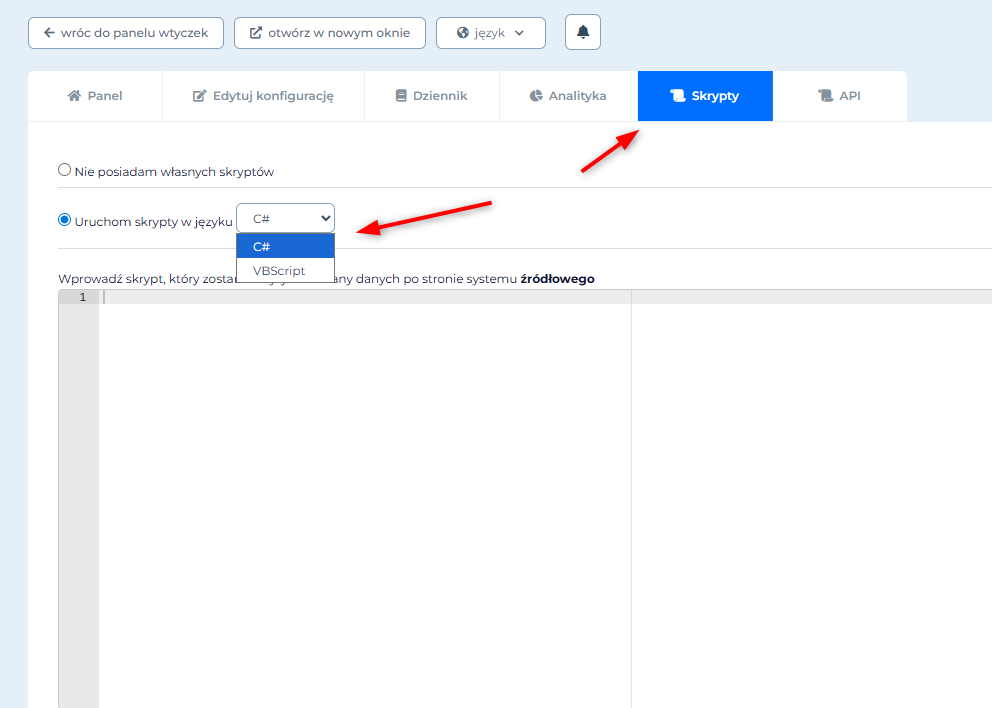
Więcej na temat skryptów, znajdziesz tutaj.